“Quick Quiz – Quiz and Exam System Web and Mobile App” Documentation by “Media City” v1.0
“Quick Quiz – Quiz and Exam System Web and Mobile App”
Created: 03/12/2018
Updated: 18/03/2026
By: Media City
Email: sudhirchechani@gmail.com
Thank you for purchasing my script. If you have any questions that are beyond the scope of this help file, please feel free to email via my user page contact form here. Thanks so much!
Table of Contents
- Overview
- Installation Laravel
- Mail Settings
- Installation Flutter
- General Settings & FAQ's
- Remove Public From URL
- Changelogs
- Update Process
- Debug Mode
- Sources and Credits
- Disclaimer
- Regular & Extended Licenses
- Privacy Policy
- Conclusion
A) Overview - top
Don't you think you should upgrade the test/exam pattern of your institute?
As we all know we moving our steps very fast with the new-new technology day by day. So why? to adopt the old pattern of taking exams. Better to update your test & exam segment forms with our developed platform named "Quick Quiz".
Read Digital + Test Digital = You will save your time as well as your capital.
"Quick Quiz" is a platform for Schools, Colleges, Institute & Coaching Centers. With the help of this platform, you can take Online-Offline Exams, Quiz, Test, Quiz Competition, Challenges etc.
About Flutter : Flutter is an open-source mobile application development SDK created by Google. It is used to develop applications for Android and iOS, as well as being the primary method of creating applications for Google Fuchsia. Flutter is Google’s mobile UI framework for crafting high-quality experiences on iOS and Android in record time.
Key Features
- Flutter App
- Web App
- Quiz and Exam System:Quiz and Exam System: A digital platform for creating, managing, and administering quizzes and exams, offering features like multiple question types, instant feedback, detailed reports, and secure user authentication.
- Support Lan: Its support local host and Lan system
- Admin Panel: A comprehensive dashboard for administrators to manage users, quizzes, settings, and view reports.
- Login System: A secure system for users to create accounts, log in, and access their profiles and quizzes.
- Secure login and change password: Ensures secure authentication for users and allows them to safely change their passwords to maintain account security.
- FAQ Pages:Frequently Asked Questions to help users find answers to common queries easily.
- Custom Pages: Enables administrators to create and manage custom content pages within the platform.
- Mail Setting through Admin Panel: Allows administrators to configure email settings, including SMTP configurations, directly from the admin panel.
- PayPal Payment Gateway: Integrates PayPal for secure online payments, enabling users to purchase quizzes.
- Paid And Free Quiz: Offers both free and paid quizzes, providing flexibility in access and monetization.
- Welcome E-Mail On/ Off through Admin Panel: Allows administrators to enable or disable the automatic sending of welcome emails to new users.
- Filtering: Implements DataTables for enhanced table functionalities, such as sorting, filtering, and pagination.
- Coming Soon Page: A placeholder page to inform users about upcoming features or the launch of new sections of the platform.
- Bootstrap Framework: Utilizes Bootstrap for responsive and mobile-first web development, ensuring consistent design and functionality across devices.
- Vue JS: Integrates Vue.js, a progressive JavaScript framework for building user interfaces.
- Cross Browser Compatible: Ensures that the platform works seamlessly across different web browsers, providing a consistent experience for all users.
- Mobile and Tablet Support: Optimizes the platform for use on mobile devices and tablets, ensuring accessibility and usability on smaller screens.
- Responsive Design: Adapts the layout and content dynamically to fit various screen sizes and devices, providing an optimal viewing experience.
- Bulk Import: Bulk question import to speed up exam creation at scale
- Question Types: Rich question types including images plus YouTube/Vimeo embeds for multimedia assessments
Where Can You Use Quick Quiz?
- Academic Institutions: Schools and colleges can use it for internal exams, chapter tests, and final assessments.
- Coaching & Tutoring Centers: Ideal for conducting mock exams, practice test series, and competitive exam
- Online Course Platforms: Integrate quizzes and tests directly into your digital learning curriculum to measure student comprehension.
- Corporate Training: Businesses can deploy it for employee training, skill assessments, and certification programs.
- Recruitment Agencies: Use it to screen candidates with standardized knowledge and aptitude tests.
Benefits of Quick Quiz
- Save Time and Resources: Eliminate the costs and labor associated with printing, distributing, and manually grading paper exams. The bulk question import feature further accelerates test creation.
- Increase Student Engagement: Make learning more interactive and fun with multimedia questions (images, YouTube, Vimeo), timed challenges, and live quiz competitions.
- Flexible Assessment Delivery: Conduct secure exams online for remote learners or use the offline mode for in-person testing environments with controlled connectivity.
- Create New Revenue Streams: Monetize your valuable content by creating paid quizzes and exam series with the built-in PayPal payment integration.
- Modernize Your Brand: Showcasing a high-tech, digital-first approach to examinations enhances your institution's reputation and appeal to prospective students.
B) Installation Laravel - top
Before install make sure you have the proper server requirements
PHP 8.2.4
OpenSSL PHP Extension
PHP Fileinfo extension
PHP Zip Archive
Allow furl extension must be enabled
JSON PHP Extension
Ctype PHP Extension
XML PHP Extension
Tokenizer PHP Extension
Mbstring PHP Extension
PDO PHP Extension
Intl PHP Extension
BCMath PHP Extension
Ctype PHP Extension
File and folder permissions
/bootstrap        775
/public/uploads   775
/storage          775
Installation with Apache
Before installing, make sure mod_rewrite is enabled.
Unzip the source file
cd /home/user/
unzip quickquiz.zip
/home/user/quickquiz, you can configure Apache virtual host as follows (remember to point the DocumentRoot to the public folder of the source)
<VirtualHost *:80>
	ServerName yoursite.com
	DocumentRoot "/home/user/quickquiz/public"
	Options Indexes FollowSymLinks
	<Directory "/home/user/quickquiz/public">
		AllowOverride All
		Require all granted
	</Directory>
</VirtualHost>
Change the director/file’s owner to Apache’s running user (www-data for example), to make sure it has proper permission on your source files
sudo chown www-data:www-data -R /home/user/quickquiz
sudo chmod 775 -R /home/user/quickquiz
Then restart Apache.
Shared Hosting Install
Consider that this is the webroot folder for your quickquiz website: /home/myusername/public_html/
Put all the main folder’s files in your quickquiz website at /home/myusername/
Move all the files in the folder /home/myusername/public/ to your webroot (example: public_html/ ou htdocs/) folder for your quickquiz website at /home/myusername/public_html/
You can delete the folder /home/myusername/public/ (it is now empty)
Create MySQL database, add user to it with full permissions.
You are done.
C) Mail Settings - top
For Email Sending.
Open and edit .env file.
MAIL_DRIVER=smtp
MAIL_HOST=smtp.mailtrap.io (For Gmail = smtp.gmail.io)
MAIL_PORT=2525  (For Gmail = 465)
MAIL_USERNAME=youremailid
MAIL_PASSWORD=yourpassword
MAIL_ENCRYPTION=null  (For Gmail = ssl)
For Mail Chimp Or Subscribe Newsletter Settings
For mail chimp or subscribe newsletter.
Open and edit .env file.
MAILCHIMP_API_KEY=yourapikey
MAILCHIMP_LIST_ID=yourlistid
Note : If showing error in reset password then must check your mail setting. Reset password error show due to you forgot add mail details in .env file.
D) Installation Flutter - top
Flutter Version :3.41.1 channel stableFlutter allows you to build beautiful native apps on iOS and Android from a single codebase.
Flutter Install and DownloadSet up an editor
Test drive
Flutter's build modes
Preparing an Android App for Release
Preparing an iOS App for Release
FAQ
Flutter Complete Documentation
Flutter Site
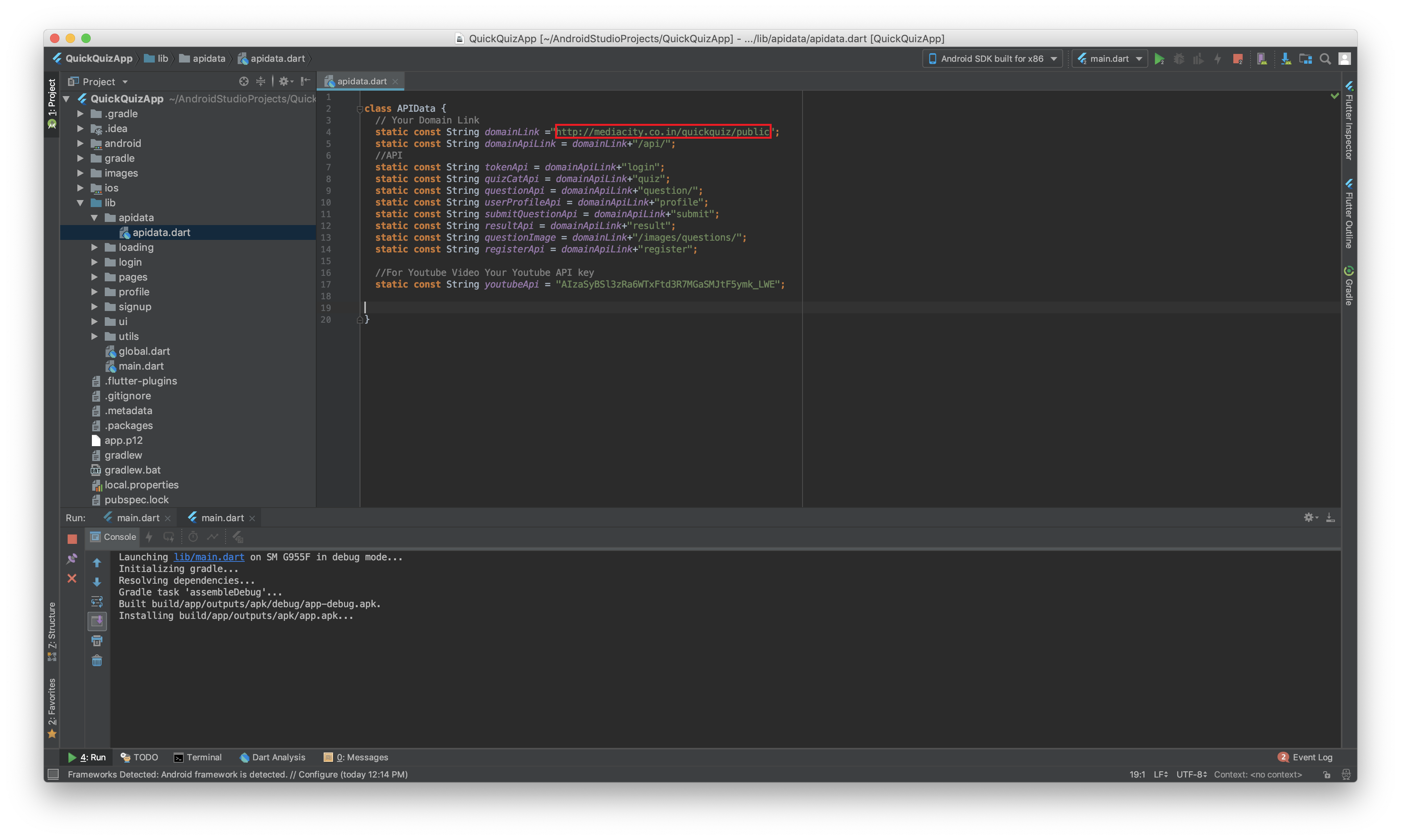
To Change Your Domain Link
E) General Settings & FAQ's - top
Reset Password Show Error
Reset password error show due to you forget add mail details in .env file.
Mail Settings For Email Sending.
Open and edit .env file.MAIL_DRIVER=smtp MAIL_HOST=smtp.mailtrap.io (For Gmail = smtp.gmail.io) MAIL_PORT=2525 (For Gmail = 465) MAIL_USERNAME=youremailid MAIL_PASSWORD=yourpassword MAIL_ENCRYPTION=null (For Gmail = ssl)
HTTP 500 Error
This error show to PHP version.
Please make sure you select PHP version 8.2.4.
Please make sure your database all details is correct.

Default Login Details
Admin:

Username: admin@info.com

Password: 123456
F) Remove Public From URL - top
To remove public from URL create .htaccess file in root folder and write following code.
<IfModule mod_rewrite.c>
	RewriteEngine On
	RewriteRule ^(.*)$ public/$1 [L]
</IfModule>
For more detail read article : https://stackoverflow.com/questions/23837933/how-can-i-remove-public-index-php-in-the-url-generated-laravel
G) Changelogs
18/03/2026 (Version 5.0)
Web Updated:
- Security Improved
- Responsive Improved
App Updated:
- Flutter Updated 3.41.1 • channel stable
- Dart 3.11.0
10/02/2025 (Version 4.0)
Web Updated:
- PHP 8.2.4
App Updated:
- Flutter Updated 3.27.3 • channel stable
02/05/2024 (Version 3.0)
Web Updated:
- Laravel Updated-10.48.10
- XSS Attack
- PWA
- User Account Delete
12/12/2022 (Version 2.0)
- Laravel-8.75
H) Update Process
How to update Web Vesrion existing scriptNote: Before Update Take Backup of All Files And Database. Make a .zip file and download all files, Go To phpmyadmin and select your database, and export it. Copy All files and paste them to your folder replace the file. Only be careful when replacing files in the public folder, don't copy .env files. Any user customizes design and code please do not update.
Copy All files of folder and paste to you folder replace file, only be careful when replace files in public folder, don't copy .env file.
Note: Any user customizes design and code please do not update.
I) Debug Mode - top
Debug mode will help you to track the error on your website. It is not all preferred to turn the debug mode on live site for very long time.
How to turn debug mode on
- Login to you FTP account.
- Open and edit
.envfile.
Change
APP_DEBUG=false
To
APP_DEBUG=true
- Save and upload the file.
false means debug mode is OFF
true means debug mode is ON
J) Source &Credits - top
Thanks for each of these people that made our Plugin/Script look amazing with their fabulous Images, Icons, Fonts, Js, Css, Api and Videos.
HTML / CSS:
- Twitter Bootstrap Images:
- freepik.com
- pixabay.com
- unsplash.com Icons:
- Icons made by Freepik from www.flaticon.com is licensed by CC BY 3.0
- Fontawesome JS:
- jQuery
- vuejs.org/ Fonts:
- Google Fonts
- Font Aawesome App:
- flutter.io Mockups:
- Pixeden
K) Disclaimer
Please be advised that it is the client's responsibility to conduct comprehensive testing of the project in both technical and non-technical aspects before making it live. We emphasize the importance of ensuring that all functionalities, integrations, and performance metrics meet your requirements and standards prior to deployment. We shall not be held responsible for any issues, errors, or discrepancies that arise after the project has gone live, including those that impact performance, functionality, or overall system operation.
Please note that we are not responsible for any kind of data loss or server crashes that may occur during the installation, updating, bug fixing, use, or maintenance of our software. We strongly recommend that all users take comprehensive backups of their data and server settings before sharing cPanel/Plesk Panel/FTP/SFTP/Cyber Panel/AA Panel/PhpMyAdmin, Server details or making any changes to their server configuration. By providing Server details or any other sensitive access credentials, you acknowledge and agree that you do so at your own risk, and it is your responsibility to ensure that your data is backed up and secure. We advise taking all necessary precautions to safeguard your data to avoid any potential data loss or service interruptions.
The user is solely responsible for ensuring their server environment is secure and properly configured. This includes applying necessary updates, monitoring for vulnerabilities, and using recommended security practices.
Any third-party services, including hosting providers, are the responsibility of the user, and we are not liable for their performance, billing, or associated issues.
We are not liable for any losses, including but not limited to:
- Bandwidth overages or additional charges.
- Data loss or corruption.
- Server provider billing disputes.
- Issues arising from phishing or other malicious activities.
- Downtime.
- Security breaches.
- Conflicts with third-party plugins, themes, or scripts.
The product provided is sold “as-is” without any warranties, express or implied. While we strive to deliver high-quality and reliable software, we do not guarantee that the software will be free of errors, bugs, or vulnerabilities. By using this software, you acknowledge and agree that you are solely responsible for how you implement, configure, and use it. We are not liable for any damages, losses, or issues resulting from the use or misuse of the software.
We do not warrant that the software will meet your specific requirements or that it will be compatible with all environments or platforms.
Prohibited Uses
You agree not to use this software for any unlawful, illegal, or unauthorized purpose, including but not limited to:
- Hacking, phishing, or spreading malware.
- Infringing on copyrights, trademarks, or other intellectual property.
- Violating privacy laws or data protection regulations.
- Hosting or distributing offensive, defamatory, or harmful content.
Disclaimer: GDPR Compliance
This software product is provided as-is and may include features designed to assist with data management and compliance efforts. However, we do not guarantee that all features or functionalities of this product meet the requirements of the General Data Protection Regulation (GDPR) or other data protection laws.
By purchasing, downloading, or using this software, you acknowledge and agree to the following:
- No Guarantee of Full GDPR Compliance: While this product may include tools or options related to GDPR compliance, it is not certified as fully compliant with GDPR or any other data protection regulations.
- Client Responsibility: It is the responsibility of the client (you) to evaluate, configure, and use the software in a manner that aligns with your specific legal obligations.
- Third-Party Verification: We recommend conducting an independent review and testing of the software to confirm its suitability for your GDPR or data protection compliance needs.
- Consult Legal Professionals: We strongly advise consulting with legal or data protection experts to understand your obligations and ensure proper compliance with GDPR or any other applicable laws.
The developer/seller of this product is not liable for any direct or indirect issues, claims, fines, or legal consequences arising from the use, misuse, or non-compliance of this software with GDPR or similar regulations.
By proceeding to purchase or use this product, you agree that it is your sole responsibility to address and ensure compliance with relevant data protection laws, and you release the developer/seller from any associated liability.
Disclaimer For Envato API
This product incorporates the use of the Envato API, but is not endorsed or certified by Envato. All Envato trademarks used in this product are the property of Envato Pty Ltd.
This product uses the Envato API but is not endorsed or certified by Envato. Our application utilizes official Envato APIs, but the functionality and content accessed through these APIs are controlled by Envato. As such, we are not responsible for any discrepancies, errors, or disruptions in the data provided by Envato's APIs.
Please note that all data fetched via Envato APIs are subject to change and may be discontinued at any time without notice. It is also subject to the terms and conditions as specified by Envato. We advise you to review Envato's terms of service and privacy policy before utilizing this feature in our product.
L) Regular & Extended Licenses
If the end users need to pay to see the end product, you need an Extended License. There can be more than one end user as long as there is only one end product. You need an Extended License if the end product is sold to end users. If the end product is free, even if you are a commercial enterprise, you only need a Regular License. If the item is used in a part that requires payment to access or make use of, you need the Extended License.
Please Read :https://codecanyon.net/licenses/standard
M) Privacy Policy
https://mediacity.co.in/privacy-policy/
Note: Images only for demo version. Images used in previews are not included in download file.
N) Conclusion - top
Once again, thank you so much for purchasing this Plugin. As I said at the beginning, I'd be glad to help you if you have any questions relating to this Plugin. No guarantees, but I'll do my best to assist. If you have a more general question relating to the Plugin on Codecanyon, you might consider visiting the forums and asking your question in the "Item Discussion" section.
Media City
Support & mail
Media City